
Odoo Integration With SAP: Real-Time Order Sync

During a phased migration, your sales team works in Odoo while finance or logistics still runs in SAP. The risk is obvious. Someone re-keys every order into both systems, and sooner or later the numbers stop matching. A real-time connector takes that risk off the table: an order typed into Odoo shows up in SAP within seconds, validated and logged, with nobody entering it twice.
SAP has been around since 1972, Odoo since 2005. Both are proven ERP platforms, and during a migration they have to live side by side for a while. This post walks through exactly how that works for sales orders, step by step.
check
How ready is your business to move from SAP to Odoo?
Free check — only at Doodex.
Start the diagnosticDuring a phased SAP-to-Odoo migration, both systems run in parallel and have to stay in sync, or you get double entry and pricing errors.
An order created in Odoo can land in SAP (ECC or S/4HANA) within seconds, through a connector that maps the fields, validates them, and confirms back.
Every transaction is logged, failures are retried, and your team gets an alert when something needs a look. That is what makes running both systems at once safe.
You start with orders and add inventory, invoices, or master data later — the integration grows with you.
Want to see it? Doodex can show you an order travel from Odoo to SAP live, and talk through your own setup.
Why Real-Time, Seamless Integration of Odoo–SAP Matters During Migration
Most mid-market manufacturers move from SAP to Odoo in phases, over several months. Sales and CRM often go first, while finance or logistics stays on SAP until cutover. In that window, every confirmed order has to exist in both places.
Without a connector, someone keys those orders into SAP by hand. That is where the pricing mismatches, missed delivery dates, and month-end reconciliation headaches come from. Keeping orders, customers, and pricing in sync automatically removes the manual step entirely.
This is usually why a company is leaving SAP in the first place: as a quick overview, SAP is often heavier and more expensive to run, while Odoo costs less to own and its user friendly interface simplifies business process management. Its modular design, backed by an open-source community, also makes customization and flexibility straightforward and helps teams adapt Odoo to specific workflows when connecting to other systems during a phased migration from SAP to Odoo. And for order-to-cash, inventory reservations, and available-to-promise checks, sync that takes seconds rather than hours is what keeps every delivery promise honest and operations more efficient.
How the Odoo–SAP Connector Works for Sales Orders
A small piece of software — the connector, or middleware — sits between Odoo and SAP. It watches for events on the Odoo side, reshapes the data, and hands it to SAP. Here is the actual sequence when an order goes through.
Step 1 — Order creation. A user can create the sale.order record in Odoo, with the customer (partner_id), currency, and payment terms, and the process is easy for users working in sales. Each line holds the product, quantity, unit price, and tax.
Step 2 — Trigger. When the order is confirmed, an Odoo webhook — an automatic "this just happened" notification — fires and sends the order to the connector as JSON.
Step 3 — Data extraction. The connector reads that payload, pulling out the header details and each line item.
Step 4 — Field mapping. Odoo and SAP name and structure things differently, so the connector keeps an explicit translation table. A few real examples:
| Odoo Field | SAP Field | Notes |
|---|---|---|
| partner_id | KUNNR (Sold-To Party) | SAP customer number |
| partner_shipping_id | ShipToParty | Shipping address |
| sale.order header | SAP Sales Order (VA01) | Document type, org data |
| order_line.product_id | Material number | SKU mapping |
| order_line.price_unit | Pricing condition | Condition records |
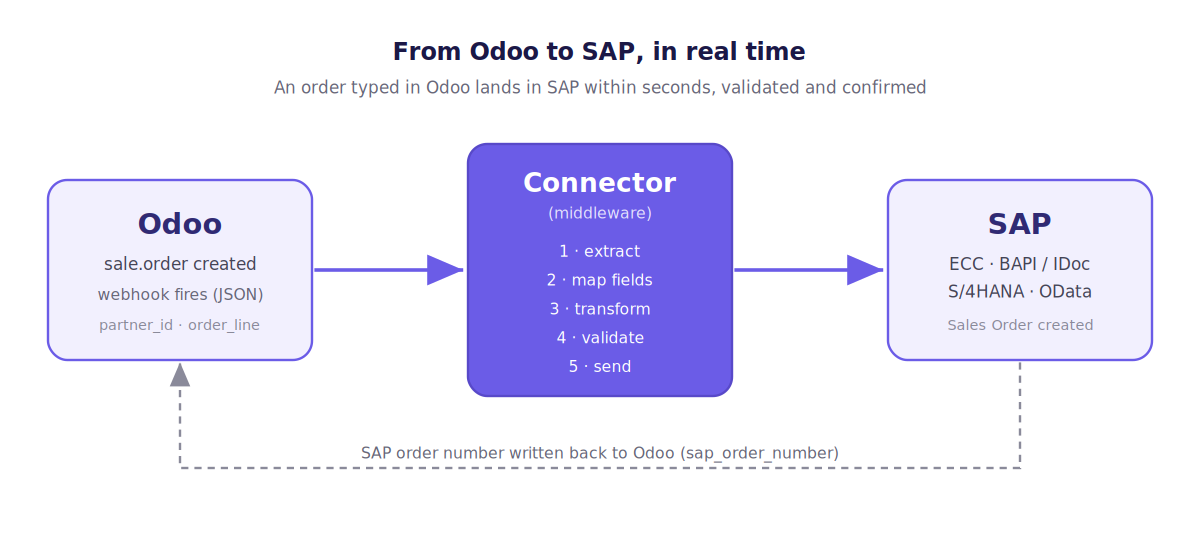
Step 5 — Transformation. The connector turns the Odoo JSON into whatever SAP expects: IDoc XML (a standard SAP data format, e.g. ORDERS05) for ECC, or OData JSON for S/4HANA. Units of measure and currencies get normalized here so nothing arrives in the wrong shape.
Step 6 — Validation. Before anything is sent, the connector checks the basics. Does this Odoo customer match a SAP customer number? Do the materials exist in the target plant? Are the mandatory SAP fields — Sales Organization, Distribution Channel, Division — filled in? Anything that fails gets flagged instead of pushed through.
Step 7 — Send to SAP. The connector calls SAP through a BAPI (a standard SAP API — BAPI_SALESORDER_CREATEFROMDAT2 for ECC) or OData REST for S/4HANA. SAP replies with a sales order number if it worked, or an error code if it did not.
Step 8 — Acknowledgment. That SAP order number gets written back onto the Odoo order (on a field like sap_order_number), so your team sees the confirmation without ever leaving Odoo and the order data stays up to date. The same pattern can integrate other applications and support a broader workflow later.
Curious how fast a real SAP-to-Odoo switch can actually happen?
Connection Methods Between Odoo ERP and SAP
On the Odoo side, you generally connect through its XML-RPC or JSON-RPC APIs, webhooks for live triggers, and scheduled jobs for batch work. Because Odoo has a modular structure and open source flexibility, your developers can more easily customize those endpoints in a flexible way to match industry requirements.
For SAP ECC, the usual interfaces are BAPIs/RFCs and IDocs, often exposed through SAP PI/PO or the SAP Cloud Connector in hybrid setups. Where standard services are locked down, a custom API wrapper can bridge the gap.
For SAP S/4HANA, OData services handle real-time sync through modern REST APIs and SAP Gateway. In a lot of cases, a pre-built connector does the job without heavy custom development, and tools such as APIcenter let users set up integrations without extensive IT knowledge, which is a relief for a small IT team. CData Connect Cloud also allows live Odoo ERP data access for connected tools or data workflows, with key features aimed at supporting connected tools and data workflows. As a rule of thumb: direct API calls are enough for live order sync, while middleware or iPaaS tools earn their keep on bigger, multi-system workflows. Whatever you pick has to fit your existing SAP landscape and your security rules as a compatible platform for broader ERP solutions, while simpler requirements can also benefit from more rapid deployment.
Within seconds
See It Live: Odoo Order Appears in SAP Within Seconds
Reading about it is one thing. Watching it happen is another. In a demo, your team gets a practical overview of the mapping view and transformation flow as someone enters an order in Odoo — a real customer, product, and quantity — and you watch it appear in SAP ECC or S/4HANA almost immediately. Doodex walks your IT team through the mapping view too, so you see exactly how each field lines up and gets transformed.
The same session works as a free consultation on your current SAP and Odoo setup, implementation approach, migration timeline, and the specific integration constraints you are dealing with, and the team can also walk through early onboarding.
Book a real-time Odoo–SAP integration demoReal-Time vs Batch Sync Modes
Not everything needs to move in real time, but sales orders usually do. The integration supports both manual and automated data exchange modes, so you can choose the right sync mode for each process and streamline data exchange.
- Real-time (event-driven): Odoo fires a webhook the moment an order is confirmed, and the connector pushes it straight to SAP. Latency is typically a few seconds.
- Batch (scheduled): Records are gathered and sent on a timer — every 5, 15, or 60 minutes. This suits big master-data sets, product catalogs, CSV imports, and historical records while preserving accuracy.
Most manufacturers run both: live sync for orders and critical stock moves, overnight batches for reference and reporting data. That keeps the setup scalable as volumes grow and supports long-term scalability without hammering either system.
Error Handling, Monitoring, and Data Integrity
This is the part that makes running both systems at once something you can trust.
Every order is validated before it is sent — customer mappings, materials, mandatory SAP fields. Every transaction is logged with a timestamp, a snippet of the payload, and SAP's response, supporting accuracy and secure monitoring with a clear audit trail.
When something transient goes wrong — a network blip, SAP briefly down — the connector retries, with backoff intervals and a cap on attempts you can set. If an order still won't post, the relevant users and IT get an alert with the actual error: "customer not found," "pricing condition missing." No silent failures.
Transfers run over encrypted transport (HTTPS or a VPN tunnel). During a parallel run, the two systems effectively become one source of truth, because any discrepancy surfaces early. Put a reconciliation report — order counts and values, Odoo versus SAP — on every go-live checklist, with logs deleted according to retention and privacy requirements.
Want the full playbook for moving without stopping the plant?
Making Odoo Integration With SAP Safe and Predictable
During a phased migration, a connector lets Odoo and SAP behave like one order flow instead of two ERP systems pulling apart. An order created in Odoo reaches SAP in seconds, with the mapping, validation, and confirmation handled at every step in a comprehensive solution. And once orders are flowing cleanly, you extend the same approach to invoices, deliveries, and beyond to scale with growth.
Less manual entry, lower cost, and a finance, logistics, and operations team that trusts the data across the SAP and Odoo world during the messiest part of a migration — that is what coexistence done right buys you. The two systems get along fine when the connection is built properly and continue to optimize day-to-day work. The honest next step is to see it run: Doodex can set up a demo and a consultation, and you decide whether it is the right choice from there.
Does this work with both SAP ECC and SAP S/4HANA?
Yes, though the plumbing differs. ECC leans on BAPIs/RFCs and IDocs; S/4HANA prefers OData and REST APIs. The connector is told which SAP endpoint to target, so for the people entering orders in Odoo, nothing changes. One thing to watch: Odoo's frequent version upgrades can break a custom integration, so a maintained connector, related third-party apps, and solid support matter for the long run — which is part of what Doodex handles.
Is the sync one-way, or can it go both ways?
Many migrations start one-way (Odoo → SAP) for orders, then go two-way later, when things like delivery status, invoice references, or shipment numbers need to flow back into Odoo. The same engine can subscribe to SAP events or poll its APIs to bring those records home, enabling seamless integration across the whole order-to-cash cycle.
What else can be synced besides orders?
Customers, materials and products, price lists, stock levels, deliveries, invoices — and employee or HR records where you need them, including contact updates during employee workflows. The advice is the same in every case: get the order-to-cash flow solid first, then add the rest once you trust it. Because Odoo expands through modules, adding functionality through apps or new data flows doesn't mean rebuilding what you already have.
How "real time" is real time?
In a well-built setup, the gap between confirming an order in Odoo and seeing it in SAP is measured in seconds. The exact number depends on your network, how loaded SAP is, and any middleware in between. Agree on a target up front so your team knows what to tune for and where to set alerts, which also improves usability for the people relying on the sync.
How is security handled?
Everything moves over encrypted transport — HTTPS, VPN, or the SAP Cloud Connector. Both ends use service accounts with least-privilege access. Bring your security team in early to settle the authentication method (OAuth2, certificate-based, or SAML where it's available) and the logging you need for compliance.