
Set up stock management in Odoo Inventory

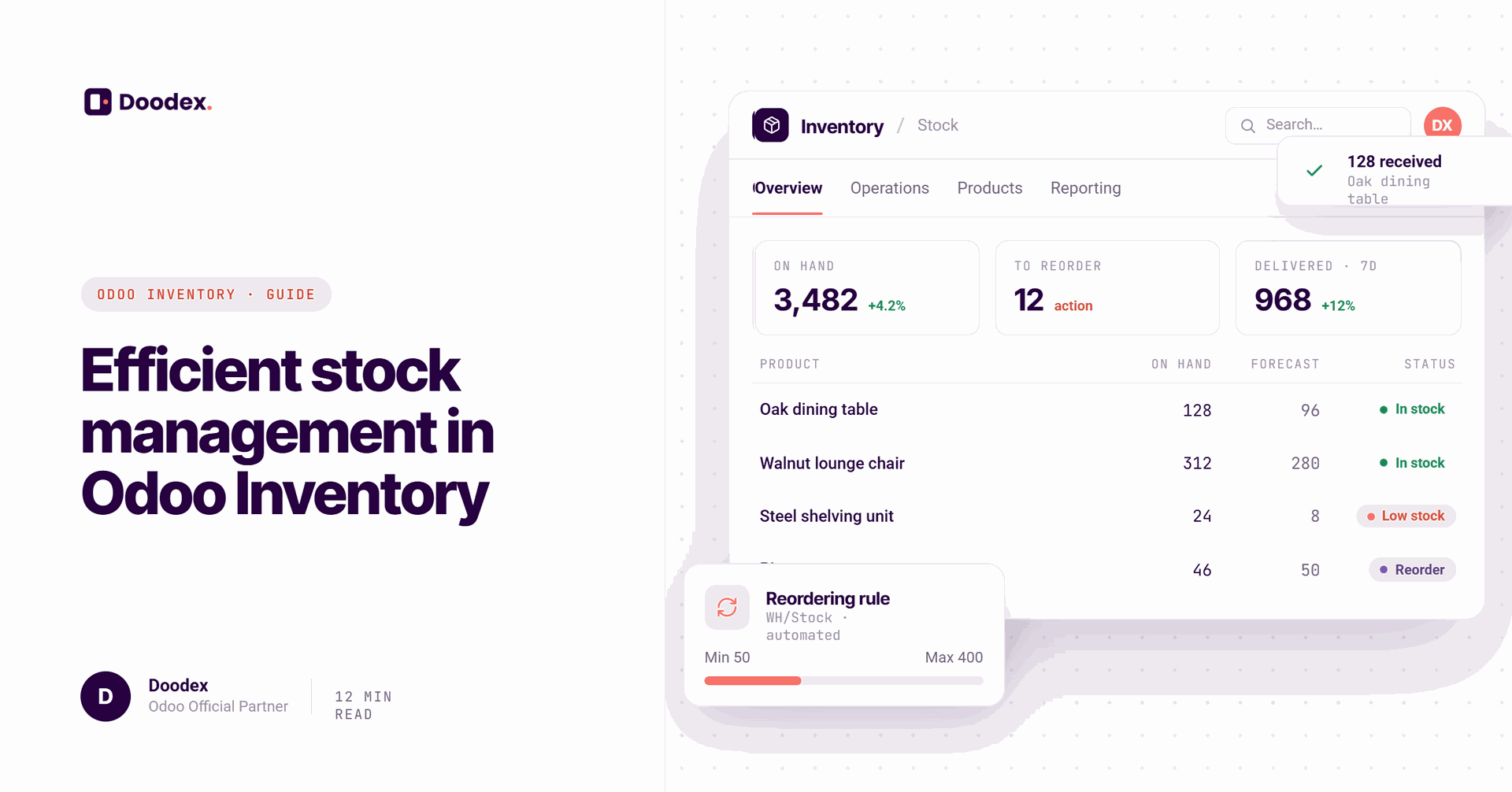
Odoo stock management is the inventory backbone of the Odoo ERP suite. Built into Odoo's inventory management module, it handles everything from tracking a single warehouse to orchestrating stock movements across an entire supply chain. Odoo allows management of multiple warehouses from a single system and connects inventory directly with Sales, Purchasing, Manufacturing, and Accounting.
What makes it stand out is that Odoo serves as both an inventory management system and a warehouse management system. It integrates seamlessly with sales, purchase, and manufacturing modules, giving SMEs and larger companies real time visibility into stock levels, automated replenishment, barcode scanning, and multi warehouse management. Odoo automates inventory management processes for efficiency, so teams spend less time on manual methods and more time on decisions that move the business forward.
session
Book your free Odoo Inventory audit
Discover how to streamline stock control, automate replenishment, and cut carrying costs with a tailored Odoo Inventory setup.
Book a free sessioncontents
- 01Key Features of Odoo Inventory Management
- 02How the Odoo Inventory Management System Works
- 03Warehouses, Locations & Multi-Warehouse Management
- 04Barcode Scanning, Inventory Count & Daily Operations
- 05Automated Replenishment, Routes & Inventory Rules
- 06Inventory Valuation, Accounting & Performance
- 07Inventory Reporting & Analytics in Odoo
- 08Odoo Inventory for Different Business Scenarios
- 09Best Practices for Setting Up & Running Odoo Inventory
- →Conclusion
Key Features of Odoo Inventory Management
Odoo inventory management packs a dense set of capabilities into one platform. Here are the key features that matter most:
- Real time inventory tracking - stock quantities update automatically on every receipt, transfer, and delivery. Real-time inventory tracking is available across all warehouses, and Odoo provides real-time inventory tracking for stock visibility.
- Multiple warehouses and storage locations - granular control over different warehouses, zones, aisles, and bins.
- Barcode scanning - Odoo supports barcode scanning for real-time inventory actions on mobile devices or dedicated barcode scanners, covering receiving, picking, packing, and inventory count.
- Serial numbers, batches, and expiry dates - Odoo allows tracking of batches and serial numbers for compliance, critical for food, pharma, and electronics.
- Automated replenishment - Odoo supports automated reordering based on stock levels through reordering rules with min-max thresholds and make-to-order workflows.
- Accounting integration - real-time valuation and cost control are fully integrated with the accounting module.
Real-time tracking helps avoid stock shortages and excess inventory, keeping product availability high and carrying costs low.
How the Odoo Inventory Management System Works
Understanding how Odoo inventory works starts with its conceptual model. Every product has a type (storable, consumable, or service), a unit of measure, and a barcode. Stock quantities exist per product and per location.
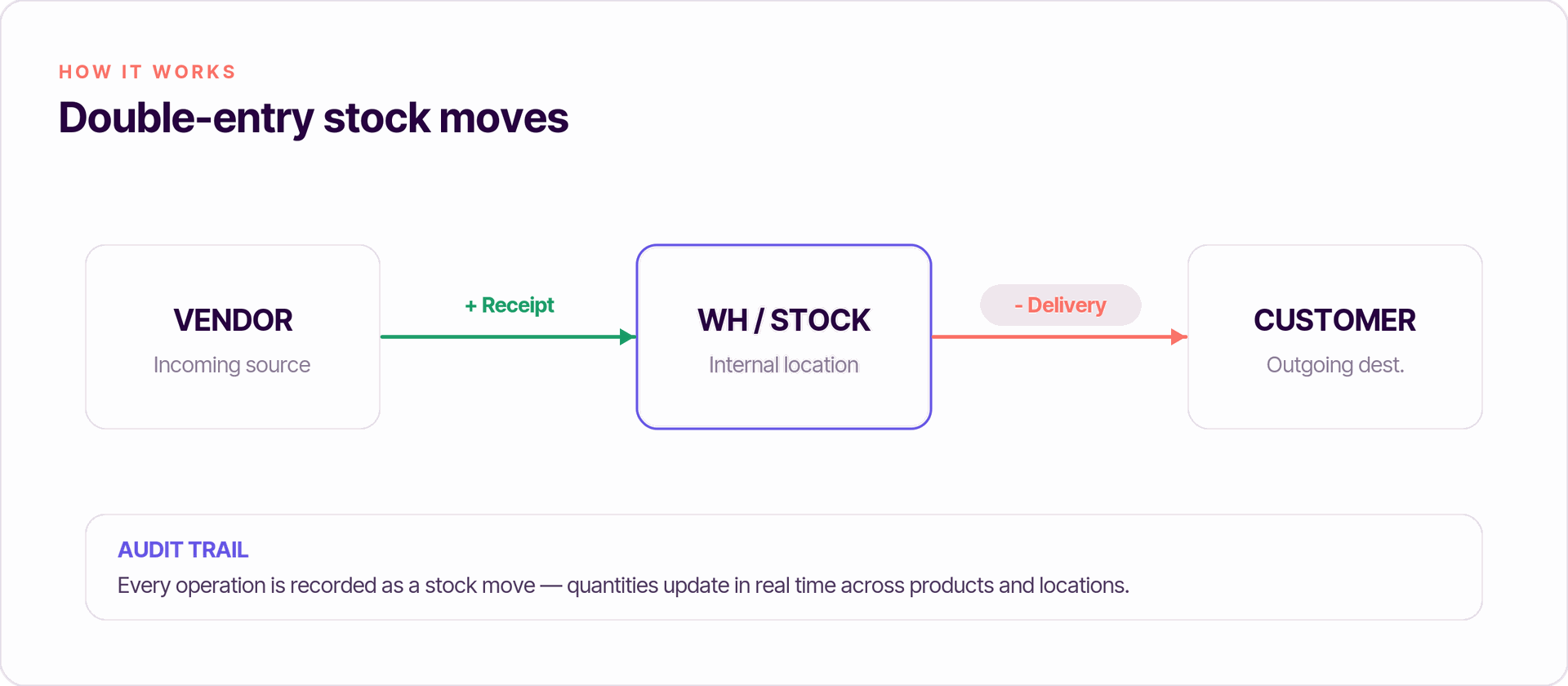
Odoo's stock management operates on a double-entry inventory system. Every operation - whether a purchase receipt, internal transfer, sales delivery, or manufacturing order - creates stock moves that update quantities in real time. The double-entry inventory system ensures every stock move is recorded, providing a complete audit trail of stock movements. Odoo updates inventory automatically with every stock movement, and inventory updates automatically with every shipment or transfer.
Physical locations include warehouses, shelves, and staging areas. Virtual locations handle inventory loss, scrap, transit, and production zones. Custom routes and push/pull rules determine how products flow between these locations, preventing discrepancies and enabling accurate tracking across every step.
Warehouses, Locations & Multi-Warehouse Management
Odoo supports single warehouse and multi warehouse management out of the box. A warehouse is a physical site with its own input dock, main stock area, and output zone. Businesses can define different stock locations within Odoo to match their real physical locations - aisles, shelves, packing zones, and quality control areas.
Location types include:
| Type | Purpose |
|---|---|
| Internal | Stock, bins, shelves inside a warehouse |
| Vendor | Incoming shipments source |
| Customer | Outgoing shipments destination |
| Transit | Goods moving between different warehouses |
| Production | Manufacturing consumption/output |
| Inventory Loss | Scrap, damaged goods |
Odoo enables tracking of inventory movements across various locations and provides real-time inventory tracking across multiple warehouses. You can manage warehouses across cities or countries under one database, using inter-warehouse transfers with transit locations to keep inventory performance and valuation accurate. Odoo allows monitoring of stock levels across multiple warehouses from a single dashboard.
Barcode Scanning, Inventory Count & Daily Operations
Day-to-day warehouse operations get dramatically faster with barcode scanning. Barcode scanning integrates with handheld scanners for efficient inventory processes, and Odoo supports barcode scanning for efficient warehouse operations across every workflow: goods receipt, putaway, picking, packing, and outgoing shipments.
For inventory count, Odoo offers multiple approaches:
- Full inventory adjustment - count everything at once
- Cycle counting - verify specific zones or fast-moving products continuously without halting operations
- Counting by location or product - targeted counts for specific areas
Cycle counts support continuous physical inventory verification without halting operations, which is essential for maintaining inventory accuracy. Companies using barcode workflows have reported reaching 99%+ accuracy compared to 85–95% with manual methods.
Daily operations also cover internal transfers, cross-docking, and quality checks - all handled from barcode-enabled interfaces. The inventory dashboard provides a real-time overview of operations, saving time and reducing errors across the board.
Automated Replenishment, Routes & Inventory Rules
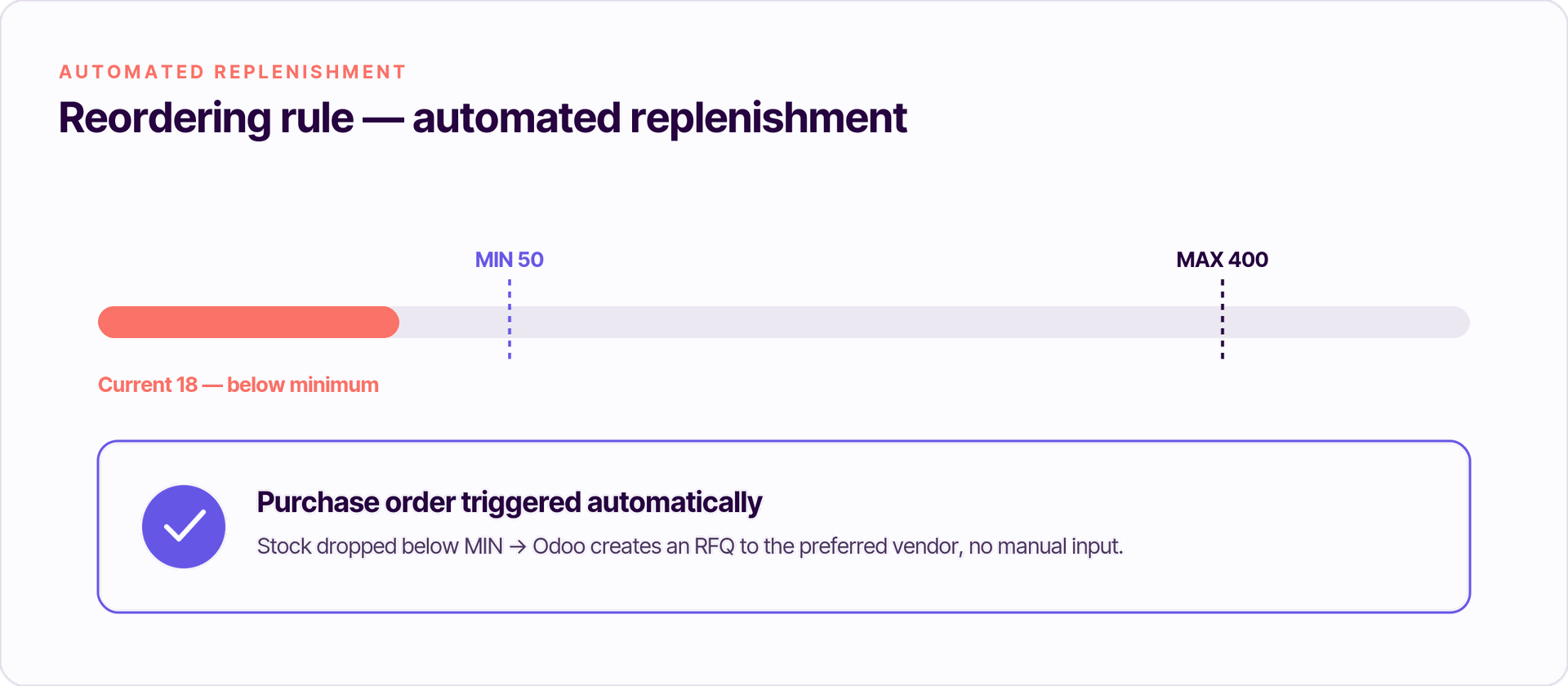
Odoo turns inventory planning from a reactive scramble into an automated process. Odoo enables automatic replenishment based on pre-defined stock thresholds, and supports automated reordering rules for multiple warehouses.
Reordering rules let you define:
- Minimum and maximum stock levels per product
- Preferred vendors and lead times
- Quantity increments
Automated reordering rules trigger purchases when stock is low, and automated purchase orders are triggered by low stock levels in Odoo. This means purchase orders fire without manual intervention.
Odoo allows custom routes for optimized product movement. You can configure make-to-stock, make-to-order, dropshipping, and cross-docking flows. Odoo supports complex logistics configurations like dropshipping and cross-docking using push and pull rules. Pull rules are demand-driven - a confirmed sale triggers a picking chain. Push rules are supply-driven - when goods arrive at input, they automatically move through quality control to storage.
Automated workflows help reduce manual input and errors in inventory management, cutting stock shortages, excess inventory, and manual planning work. Odoo supports automated reordering based on minimum stock levels across product categories.
Free session
Looking for Odoo inventory setup assistance?
Book a free working session with a Doodex Odoo specialist and get your stock management configured right the first time.
Book a meetingInventory Valuation, Accounting & Performance
Accurate financial records depend on correct stock valuation. Odoo supports multiple valuation methods:
- FIFO - oldest cost layers consumed first, ideal when costs fluctuate
- Average Cost (AVCO) - weighted average updated on each receipt, suited for commodities
- Standard Price - fixed cost set manually, useful when prices are stable
Odoo supports multiple inventory valuation methods such as FIFO and LIFO. With perpetual (automated) valuation, every stock move generates accounting entries in real time. Odoo integrates inventory management with sales and accounting modules, keeping COGS, inventory assets, and balance sheets synchronized. Odoo's inventory module integrates with accounting for real-time updates, and Odoo integrates inventory movements with accounting for accurate reporting. Inventory updates automatically with confirmed sales orders.
Key inventory performance metrics to monitor include inventory turnover, aging reports for identifying dead stock, service levels, and inventory accuracy. These enable businesses to make informed decisions about purchasing, pricing, and route optimization.
Inventory Reporting & Analytics in Odoo
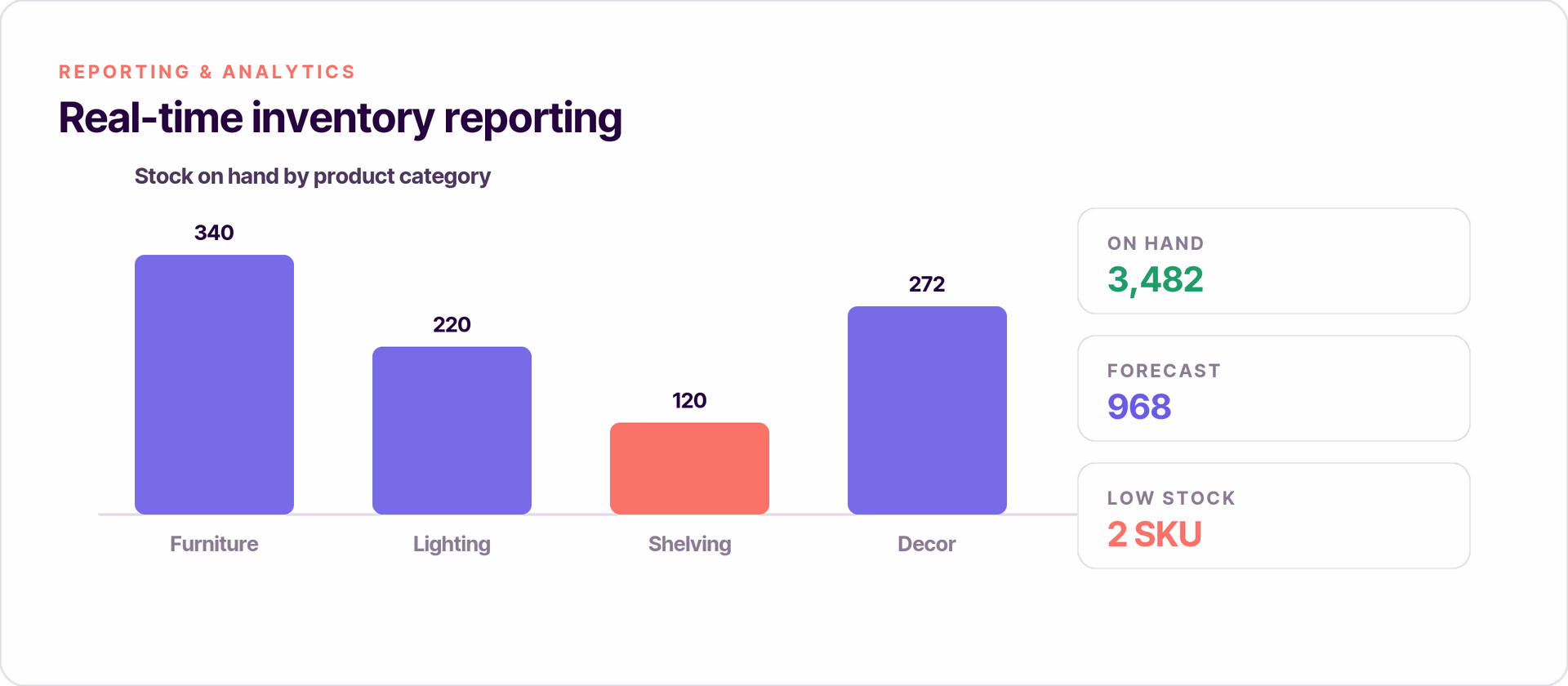
Inventory reporting is what turns raw data into informed decisions. Odoo provides detailed inventory reporting for better decision-making through several standard reports:
- Stock on hand - by product, warehouse, or location
- Valuation reports - current inventory value by product categories
- Aged inventory - how long items have been sitting in stock
- Forecasted stock - projected availability based on incoming shipments and demand
Real-time reporting provides visibility into stock levels and movements. Dashboards and pivot tables let you filter by product, category, warehouse, or period to identify slow-moving items, overstock, and frequent stockouts. Use these insights to refine safety stock levels, purchasing strategies, and custom routes.
Odoo Inventory for Different Business Scenarios
Odoo stock management adapts across various sectors and business processes:
- Retail and eCommerce - manage online and in-store stock simultaneously, support click-and-collect and real-time product availability. Odoo supports integration with third party shipping carriers for cost calculations on outgoing shipments.
- Manufacturing - link Bills of Materials and manufacturing orders to raw materials consumption. Work orders pull from specific storage locations and output finished goods automatically.
- Distribution and wholesale - multi warehouse management with bulk picking, wave picking, and carrier integration for faster operations and order fulfillment.
- Regulated industries - the system allows tracking of products by unique serial numbers for quality control, with lot tracking and expiry enforcement for compliance in food, pharma, and electronics.
Connecting production to your stock?
Best Practices for Setting Up & Running Odoo Inventory
Careful setup is the difference between a successful business running smoothly and months of cleanup later. Initial setup requires defining warehouses, locations, and product categories before going live.
Here is a practical checklist:
- Map your layout - define all physical locations, from warehouses down to shelf-level bins. Assign barcodes to every location.
- Standardize master data - clean up SKUs, product variants, vendor codes, product weights, and units of measure before importing.
- Choose valuation early - decide between FIFO, AVCO, or Standard Price after consulting finance. Changing mid-operation creates inconsistencies.
- Configure replenishment - set reordering rules with realistic lead times, safety stock, and preferred vendors for each product or category.
- Set access rights - control who can validate stock movements, perform cycle counting, and adjust inventory valuation.
- Count regularly - run cycle counts on fast movers weekly and full counts quarterly. Review aged inventory reports monthly to catch slow-moving stock.
Ongoing discipline matters as much as initial configuration. Monitor that routes and rules stay aligned as your business adds new warehouses, vendors, or product lines.
Conclusion
Odoo's inventory management system centralizes stock control, automates flows, and scales with your business. From real time inventory tracking across multiple warehouses to automated replenishment and integrated accounting, it replaces fragmented manual methods with a fully integrated platform. The result: fewer stock shortages, lower carrying costs, accurate inventory counts, and stronger inventory performance - all of which improve customer satisfaction and help you scale confidently in competitive markets.
Whether you operate a single warehouse or manage warehouses across multiple companies and countries, Odoo inventory enables businesses to reduce costs, reduce waste, and reduce risks simultaneously. The path forward starts with mapping your current warehouse and business processes, then exploring how odoo stock management can digitize them.
Your Odoo partner
Ready to modernize your stock management?
Doodex maps your current warehouses and business processes, then implements Odoo Inventory end to end - real-time tracking, automated replenishment, and integrated accounting. Talk to our team to get started.
Talk to a Doodex expertanswered
How long does it take to implement Odoo Inventory, and will it disrupt my operations?
A focused inventory go-live usually takes 4 to 8 weeks for a single warehouse, and longer for multi-site or heavily customized setups. Doodex runs it in phases: we configure and test in parallel with your current system, migrate your data, train your team, then cut over during a low-activity window so daily operations keep running.
Can Odoo connect with the tools we already use — our webshop, accounting, or shipping carriers?
Yes. Odoo Inventory connects natively with Odoo Sales, Purchase, Accounting, eCommerce, and Point of Sale, and integrates with third-party shipping carriers and external platforms such as Shopify, marketplaces, EDI, or custom APIs. If you keep an external ERP or accounting tool, we build the sync so stock and orders stay aligned.
We already have stock data in spreadsheets or another system — can you migrate it?
Yes. We clean and import your products, variants, categories, units of measure, and current on-hand quantities. We also reconcile opening stock and valuation with finance so your first Odoo balance matches your books, and your existing product codes are reused.
Can Odoo be tailored to our specific processes, or do we have to change how we work?
Odoo is highly configurable out of the box — warehouses, routes, operation types, and reordering rules cover most needs without any code. Where you have a genuinely unique process, Doodex builds targeted configurations or a small custom module. We start from your real workflow, configure first, and only customize what truly adds value, which keeps future upgrades smooth.
How much does it cost, and is it really cheaper than our current system?
Cost depends on your number of users, the apps you enable, hosting, and the implementation scope — there is no fixed sticker price. For most SMEs Odoo lands well below legacy ERP licensing, and our pilot-first approach lets you validate the fit before committing to a full rollout. We provide a clear, itemized quote after a short scoping session.